MojiSudoku - How to Play
Last Updated: August 11, 2026.
🧩 How to Play MojiSudoku
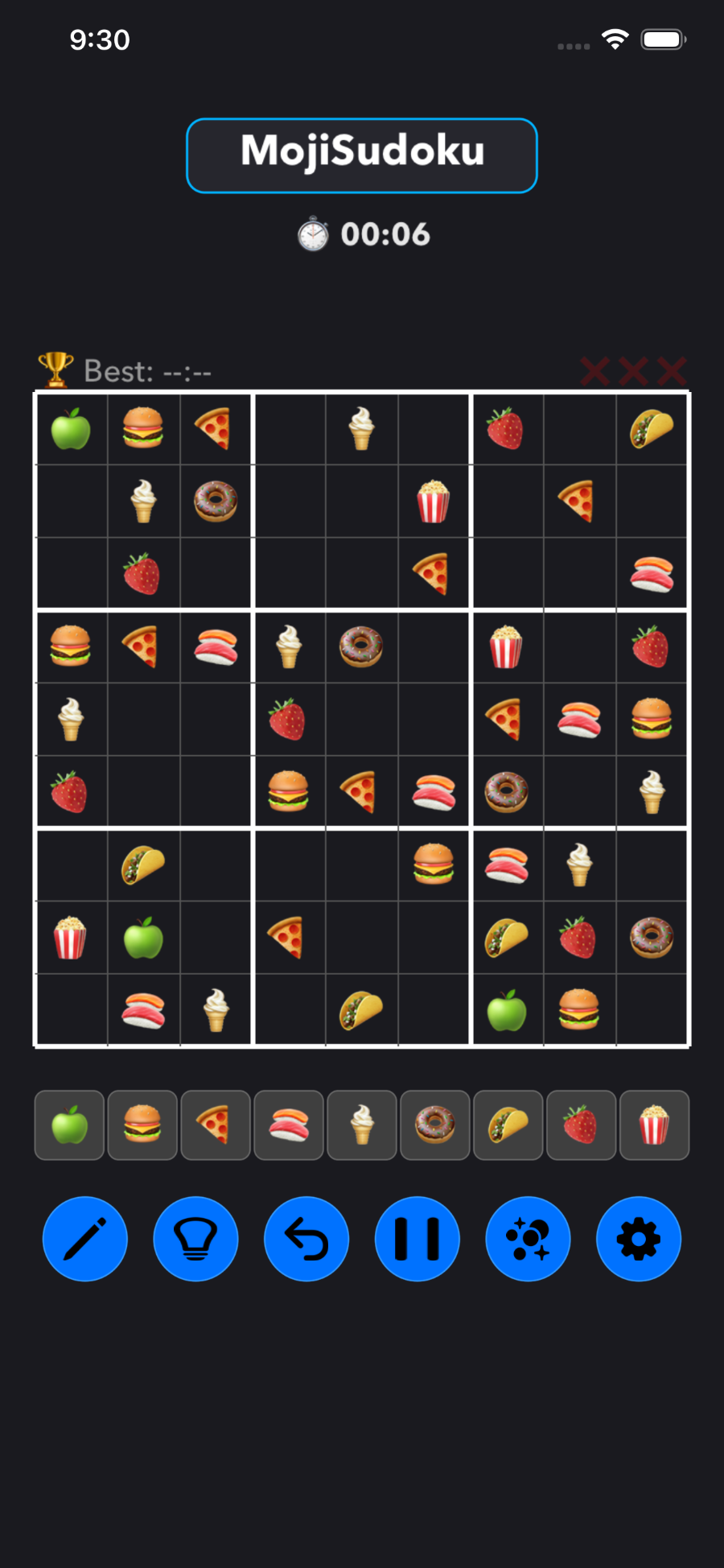
The goal of MojiSudoku is simple: fill the entire 9x9 grid with emojis so that every row, column, and 3x3 block contains 9 completely unique characters.
1. Select a Grid Cell
Tap any blank space on the board grid canvas to highlight it.
A light blue crosshair will highlight the corresponding row and column to help you scan for duplicates.
2. Place an Emoji
Tap any emoji button on the bottom input row to place that character into your selected cell.
The Golden Rule: The same emoji cannot appear more than once in any single row, column, or highlighted 3x3 sub-grid block.
3. Use Pencil Mode for Notes ✏️
Stuck on a difficult square? Tap the Pencil (✏️/📝) button to turn note-taking on.
While active, tapping emojis will place miniature "draft" notes inside the cell so you can map out possibilities without committing to a final guess.
4. Utilize Your Tools 🔵
Hint (💡): Stuck? Highlight a blank cell and tap Hint to automatically reveal the correct emoji. You get 3 per match!
Undo (↩️): Made a wrong placement step? Tap Undo to instantly rewind your previous board states.
Pause (⏸️): Tap Pause to freeze the game clock and obscure the grid if you need to step away from your device.
5. Watch Your Strikes! ❌
If you place an incorrect emoji that violates the grid logic, the board will shake and you will earn an error strike.
Accumulating 3 Strikes results in an immediate Game Over, so think carefully before you strike a tile!